
How to Build a 48V 16S LiFePO4 Battery with the JK-PB2A16S20P BMS
DIY battery guide · 48V / 16S
How to Build a 48V 16S LiFePO4 Battery with the JK-PB2A16S20P BMS
Assemble sixteen cells, check every connection and configure the JK app. We use 314Ah cells as the example, with capacity and current calculations you can apply to other LiFePO4 cells.
1. Understand 16S, capacity and current
16S means sixteen cells connected in series. Connect each cell’s positive terminal to the next cell’s negative terminal. The voltages add together; the amp-hour capacity stays the same as one cell.
A pack built with sixteen 280Ah cells is 51.2V, 280Ah and approximately 14.34kWh nominal. A 304Ah build is approximately 15.56kWh. These figures describe stored nominal energy; delivered energy depends on the operating window and system losses.
Calculate charge and discharge current separately
Read the cell datasheet for its permitted continuous charging rate and continuous discharge rate. If the manufacturer gives a C-rate, calculate current as follows:
| C-rate | Calculation | Current |
|---|---|---|
| 0.2C | 314 × 0.2 | 62.8A |
| 0.5C | 314 × 0.5 | 157A |
| 1C | 314 × 1 | 314A |
Use the rate specified for your cells and temperature. The same current flows through all sixteen series cells, so there is no multiplication by sixteen when calculating the pack’s amp limit.
Some cells use a power rating instead. EVE’s MB31 specification uses P-rate. For a fresh 1004.8Wh MB31 cell, 0.5P is 502.4W per cell. Calculate the corresponding current with amps = watts ÷ actual cell voltage: about 157A at 3.2V, or 138A at 3.65V. Use the datasheet’s temperature and operating tables when setting a fixed current limit. Read the EVE MB31 specification.
The V19 JK-PB2A16S20P is the 200A model with a 2A active balancer. Confirm the rating on your supplied unit. Set normal charge and discharge currents within the lowest applicable rating of the cells, BMS, cables, busbars, terminals and other equipment. A higher BMS rating does not increase the cells’ permitted current.
2. Prepare your parts and cells
- Sixteen matching 3.2V LiFePO4 cells, with their capacity and datasheet.
- A JK-PB2A16S20P BMS with its matching sampling harnesses, temperature probes, B+ supply lead and activation button or display.
- A suitable enclosure, cell restraints, insulating base and cell separators.
- Busbars and terminal hardware made for the cells, plus insulated covers.
- Battery cables, correctly crimped lugs, a main fuse and DC isolation equipment selected for the complete pack.
- A multimeter rated for the pack voltage, insulated tools, eye protection and a suitable torque tool.
- A configurable 16S LiFePO4 charger, and a compatible inverter if required.
Choose protection devices for the pack’s maximum voltage and prospective fault current, as well as the normal load. Install the main fuse close to pack positive and size it to protect the wiring. The BMS’s electronic protection is additional to this fuse.
Before assembly, disconnect chargers and loads, remove jewellery and cover terminals outside the area being worked on. Keep loose hardware and conductive tools away from the cell tops. Set the multimeter to DC volts before measuring; never place a meter set to current across a cell or pack.
Check each cell for damage and measure its voltage with the same meter. Record the readings and label the cells 1 to 16. Resolve a damaged cell or an unexplained voltage difference before assembly. Follow the supplier’s initial balancing procedure; the active balancer does not replace cell matching.
Compare cell layouts and busbar requirements in our LiFePO4 cell configurations guide.
3. Assemble and secure the cells
- Lay out the cells in the enclosure and mark the intended series path. Identify cell 1 negative as pack negative and cell 16 positive as pack positive.
- Fit the insulating base, separators and restraints specified for the cells and enclosure. Protect cell cases from conductive surfaces and keep pressure-relief vents clear.
- Connect cell 1 positive to cell 2 negative, then continue the series chain through cell 16. Recheck polarity before fitting each busbar.
- Use the approved terminal hardware and tighten to the specified assembly torque. Support the cables so their weight cannot twist the terminals.
- Cover the completed connections and secure the pack so the cells and busbars cannot move.
Follow the cell and enclosure instructions for compression and mounting. Use the torque specified for the actual terminal assembly, including any fitted studs or adapters.
Measure from pack negative to pack positive. The reading should equal the sum of your sixteen measured cell voltages. A reversed cell or incorrect busbar connection must be corrected before the BMS is connected.
4. Wire the BMS and check the cell taps
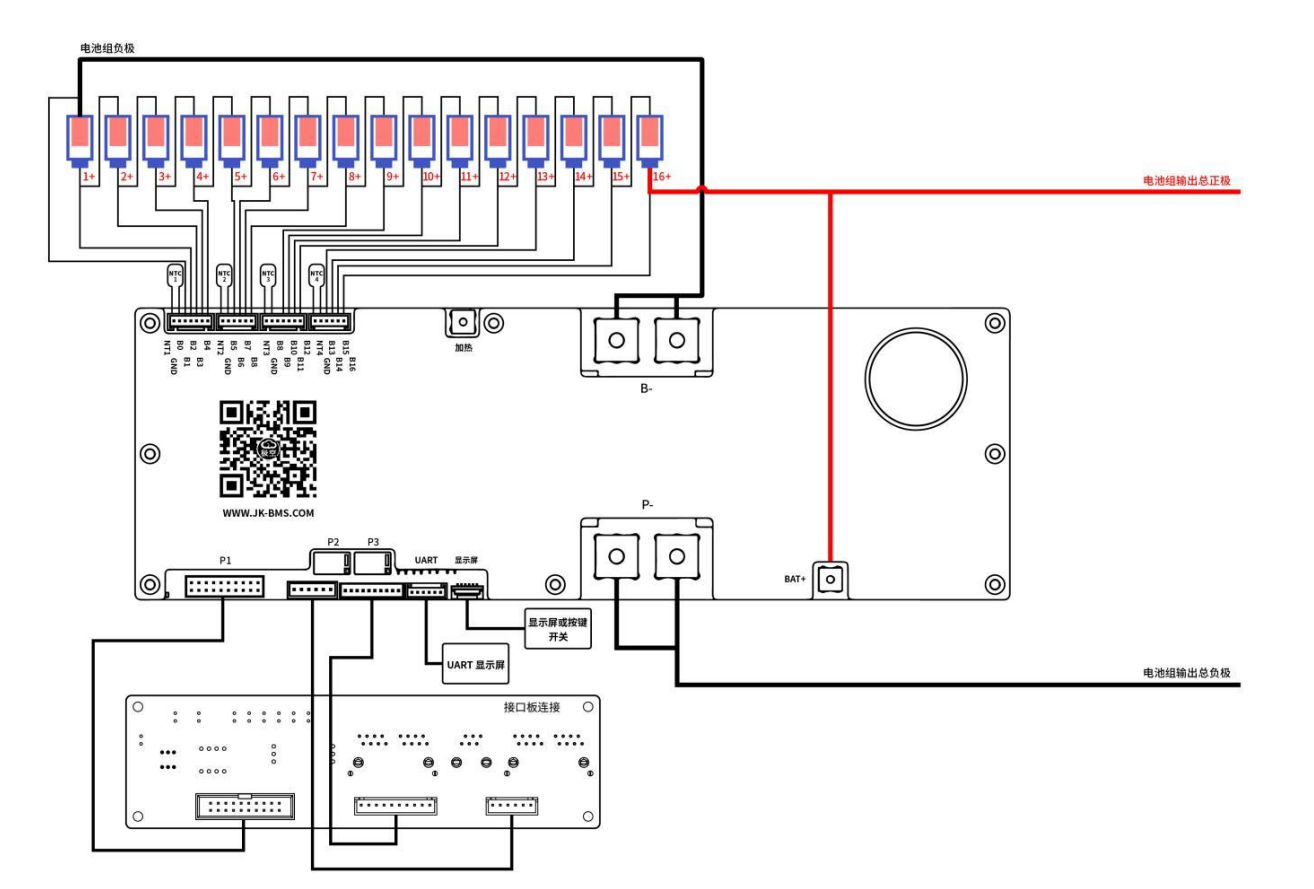
Mount the BMS securely with its specified cooling space. Fit and secure the temperature probes as directed, with the sensing surfaces against the cells. Route all small wires clear of busbars, sharp edges and pinch points.
Main current connections
Pack negative → B− [ JK BMS ] P− → charger and load negatives
Pack positive → main fuse → DC isolator → charger and load positives
Separate B+ supply lead → pack positive, as shown in the matching JK diagram
B− connects to raw battery negative. P− is the protected negative for external charging and loads. Route external negative connections through P− so current passes through the BMS. The small B+ power connection, sometimes marked BAT+, supplies the BMS; it is separate from the final cell-sense tap and does not carry the inverter’s main positive current.
Identify the seventeen cell measurement points
A 16S pack has seventeen unique cell-voltage measurement points: B0 at pack negative, then B1 to B16 at the successive cell positives. Follow the connector drawing for your hardware revision to identify the physical pins.
| Tap | Battery connection |
|---|---|
| B0 | Cell 1 negative / pack negative |
| B1 | Cell 1 positive |
| B2 | Cell 2 positive |
| B3 | Cell 3 positive |
| B4 | Cell 4 positive |
| B5 | Cell 5 positive |
| B6 | Cell 6 positive |
| B7 | Cell 7 positive |
| B8 | Cell 8 positive |
| B9 | Cell 9 positive |
| B10 | Cell 10 positive |
| B11 | Cell 11 positive |
| B12 | Cell 12 positive |
| B13 | Cell 13 positive |
| B14 | Cell 14 positive |
| B15 | Cell 15 positive |
| B16 | Cell 16 positive / pack positive |
In the V19.0.3 connector tables, P6 carries B0–B4, P7 carries B5–B8, P8 carries B9–B12, and P9 carries B13–B16. The connectors also carry temperature-sensor connections. P8’s extra B8 position is reserved; leave it unconnected for this documented harness. Use the functional B8 on P7. Identify leads by the matching diagram rather than colour alone.
Watch the video
Check the harness before plugging it in
- Keep the sampling plugs disconnected from the BMS while attaching and measuring their leads. Fit the leads to their labelled cell points using the matching JK instructions.
- At the unplugged harness, measure each successive pair of cell taps: B0 to B1, B1 to B2, and so on through B15 to B16. Each must show the positive voltage of that individual cell.
- Keep the black probe at B0 and measure B1 through B16. The voltage must increase by one cell each step. B0 to B16 must match total pack voltage.
- Compare the results with the voltages measured directly at the cells. Correct a negative reading, missing step or double-cell step before continuing.
- Complete the main cables, B+ supply and sampling-plug connections in the sequence specified for your BMS revision, with external chargers and loads still isolated.
For example, if each cell measures 3.30V, the cumulative readings are 3.30V at B1, 6.60V at B2, 26.40V at B8 and 52.80V at B16. Use your measured cell voltages for the actual checks. Keep probe tips insulated and separated so they cannot bridge adjacent pins.
5. Activate the BMS and configure the app
Use the supplied activation button or compatible display after the wiring checks are complete. If using charger activation, follow the matching JK procedure while keeping the charger inside the cells’ permitted voltage range.
Install the JK app from the JK downloads page. Enable Bluetooth, grant the permissions required to scan and select your BMS inside the app. Record the model, hardware and firmware versions before changing settings.
Keep charging and discharging disabled while configuring the battery. Select LiFePO4 first, then enter and save the pack settings. Recheck them after selecting a chemistry profile or loading defaults.
| Setting | What to enter or check |
|---|---|
| Battery type | LiFePO4 / LFP / lithium iron phosphate. |
| Cell count | 16. Confirm that sixteen cell voltages are displayed. |
| Battery capacity | 314Ah for sixteen 314Ah cells in series. Enter the actual capacity for other cells. |
| Cell overvoltage and recovery | Use thresholds within the cell specification. The recovery voltage must be below the overvoltage trip point. |
| Cell undervoltage and recovery | Use thresholds within the cell specification. Recovery must be above the undervoltage trip point; normal load shutdown should occur earlier. |
| Charge current protection | Coordinate with the cells’ charge rating and the complete charging circuit. Set the charger’s normal current separately. |
| Discharge current protection | Coordinate with the cells’ discharge rating, BMS and wiring. Account for the inverter’s continuous demand and documented surge behaviour. |
| Temperature limits | Apply the cells’ charge and discharge limits, including required current reduction near temperature boundaries. Check every fitted probe. |
| Active balance | Enable balancing and set its start voltage, voltage-difference trigger and current for the chosen cells. The PB2A model has a maximum 2A balancing current. |
| SOC and calibration | Set the capacity and SOC voltage parameters using JK’s procedure. Compare readings with suitable instruments before adjusting voltage or current calibration. |
| Control switches | Enable charge and discharge after all checks pass. Keep emergency operation disabled during normal setup. |
JK’s Parameter Settings Guide V2.3 explains these fields. Menu names depend on the app and firmware. Save screenshots of your completed settings.
Check cold-charge protection explicitly. The MB31 operating specification gives a 0°C lower charging boundary, with reduced charging power at low temperatures. A single maximum-current setting cannot implement every temperature-dependent limit; configure the charger or communicating inverter to follow those limits.
6. Set up the charger and inverter
Set the charger for a sixteen-cell LiFePO4 battery. Calculate the pack voltage from the chosen per-cell target:
| Per-cell target | 16S pack target |
|---|---|
| 3.45V | 55.2V |
| 3.50V | 56.0V |
| 3.55V | 56.8V |
Select the daily charge target using your cells’ instructions and the LiFePO4 Australia charging guide. Allow headroom below the BMS overvoltage trip point and watch individual cell voltages during charging. Disable lead-acid equalisation and desulphation modes.
Set charging current and inverter demand within the limits calculated in step 1. At a fixed power, the battery current rises as pack voltage falls. For example, 5kW drawn from the battery is approximately 98A at 51.2V or 111A at 45V; supplying 5kW of AC output requires additional input power for inverter losses.
Set the inverter’s normal low-battery shutdown before the pack reaches BMS undervoltage protection. Use the inverter’s specified precharge procedure before its first connection.
If using CAN or RS485, select the protocol, cable pinout and settings documented for the exact inverter and JK interface board. Verify that the inverter receives battery voltage, SOC, charge and discharge limits, and responds to them. For a Victron setup, see our JK BMS and Victron CAN guide.
7. Test and finish the battery
- Check the battery at rest. Compare all sixteen app voltages with the multimeter readings. Confirm total voltage, plausible temperatures and no active alarms.
- Check the output controls. With a small fused load connected, verify the discharge switch stops and restores the load as intended. Check the charge switch during a low-current charging test.
- Charge at low current. Use the protected connections and watch every cell, especially near the top of charge. Check the busbars, lugs and BMS for unexpected heating.
- Check cell balance. If one cell reaches its voltage limit early, stop and inspect its connections and sense lead. Confirm balancing settings and follow the cell supplier’s balancing procedure.
- Increase demand in stages. Monitor current, cell voltage spread and temperatures as the load rises. Remain inside the component and cell limits.
- Complete the enclosure. Fit insulating covers, secure cables with strain relief and close the enclosure. Label chemistry, 16S configuration, nominal voltage, capacity, polarity and the designed operating current limits.
Investigate a protection trip before restarting. Use the manufacturer’s commissioning methods for protection checks; do not create a short circuit, overcharge a cell or heat the pack to force a trip.
8. Troubleshooting
The BMS does not start
Check pack voltage, the B− connection, the separate B+ supply and the activation button or display connection against the matching diagram. Check all sampling readings before repeating the specified activation procedure.
A cell is missing or the voltage looks wrong
Stop charging and discharging. Compare the affected cell’s direct reading with its harness reading. Follow JK’s disconnection sequence before moving any lead; check loose terminals, wrong tap positions and the reserved B8 position.
There is no charging or load output
Check the fuse, isolator, app switches and active alarms. Confirm the charger and load negatives connect to P−. A voltage reading alone does not prove the output can supply current.
The balancer is idle
Check its switch, start voltage and voltage-difference threshold. Balancing starts only when its configured conditions are met. Similar resting voltages through LiFePO4’s flat voltage range do not establish equal state of charge.
The battery percentage looks wrong
Confirm the capacity is the capacity of one series cell. Check for external negative connections bypassing the BMS’s current measurement, then follow JK’s SOC calibration procedure.
9. Manuals and related products
- JK-PB2A16S20P V19 200A BMS with 2A active balancer
- JK energy-storage BMS manual V19.0.3 — ratings on pages 8–9, connector definitions on pages 23–24 and 16S wiring on page 31.
- JK protection-board parameter settings guide V2.3
- JK app and manual downloads
- EVE MB31 cell specifications
- LiFePO4 Australia charging guide
- Build a smaller battery with our 12V 4S JK BMS guide