How to Install and Configure a JK BMS for a 12V 4S LiFePO4 Battery
Prepare your four-cell battery, check the wiring and set up the JK app. The two videos below cover basic setup and the settings menu.
Check the current rating: the videos and V19.3.1 reference manual cover the 200A B2A8S20P. The B2A8S30P sold here is the 300A model with a 2A active balancer. Use your model’s current limits when configuring the app; a peak rating is not a continuous rating.
1. Understand 4S and prepare your parts
4S means four cells connected in series. Four nominal 3.2V LiFePO4 cells make a 12.8V battery, commonly called a 12V battery. The amp-hour capacity stays the same as one cell: four 280Ah cells in series make a 12.8V, 280Ah pack.
The BMS monitors cell voltages, current and temperature, and can stop charging or discharging when a protection limit is reached. Its active balancer transfers energy between cells to help keep them balanced.
You will need
Four matched LiFePO4 cells and their datasheet.
A JK BMS suitable for 4S LiFePO4, with its wiring harness, temperature sensors and starter button or display.
Busbars, cables, lugs, a main fuse and an isolator rated for the planned load.
Insulation, terminal covers and a suitable battery enclosure.
A multimeter, insulated tools, crimping equipment and a torque tool.
A LiFePO4-compatible charger configured for your cells.
The cells, cables, connectors and BMS must all handle the intended current. Choose the fuse to protect the wiring; fitting a 300A BMS does not make the rest of the pack suitable for 300A.
Before working: disconnect chargers and loads, remove jewellery and cover exposed terminals. A 12V battery can deliver enough fault current to melt tools or start a fire. The BMS does not replace a fuse. Have an experienced battery builder do the wiring if you cannot safely identify and check each connection.
2. Watch the setup videos
Start with Basic Setup, then watch Detailed Settings Runthrough. Both videos are by Offgrid Power Solutions and demonstrate the B2A8S20P.
Check each cell’s condition, polarity and voltage. Follow the cell supplier’s initial balancing, mounting and compression instructions. Assemble the four cells in series, insulate exposed conductors and tighten connections to the cell manufacturer’s specified torque. Leave chargers and loads disconnected.
Mount the BMS and sensors
Secure the BMS so it cannot move or contact exposed terminals. Allow the clearance and cooling specified in its instructions. Fit the temperature sensors against the cells as directed and secure the sensor cables.
Connect the main cables
B− is the battery-negative connection. P− is the protected negative connection for the charger and loads. Follow the supplied wiring diagram for the positive cable and any separate BMS power-supply lead. Connecting external equipment directly to battery negative can bypass the BMS protection.
Connect and check the balance wires
The thin balance/sense wires let the BMS measure each cell individually. A pack needs one cell-sense connection at battery negative, plus one at the positive terminal of each series cell.
Five sense wires for 12V; nine for 24V.
12V / 4S: four cells and five cell-sense connections.
24V / 8S: eight cells and nine cell-sense connections.
Set the app’s series-cell count to 4 for 12V or 8 for 24V. Any separate BMS power-supply lead is additional to the sense-wire count. Use the harness diagram to identify the connector positions and any unused leads.
Keep the harness unplugged from the BMS while attaching and checking its leads. Follow the connection order in the BMS instructions.
Check each lead against the harness diagram, including any separate power-supply lead.
Set your multimeter to DC voltage. Check polarity, individual cell voltages and total pack voltage at the points shown in the diagram. Keep probe tips from touching adjacent pins.
Stop and correct any reversed, missing or unexpected reading.
Once the readings and main connections are correct, connect and power up the BMS in the specified order.
Never put a multimeter in current mode across a cell or battery. This creates a short circuit through the meter.
4. Activate the BMS and configure the JK app
After checking the wiring, activate the BMS using the supplied starter button or the charger-activation procedure in its instructions. Do not short terminals or connector pins to wake it up, or raise the charger voltage above the cells’ permitted limit.
Install the JK app using the link supplied with the BMS. Turn on Bluetooth, allow the permissions needed to connect, then scan for and select your BMS from within the app. Menu names vary between app and firmware versions.
Setting
For a 12V 4S battery
Battery chemistry
Select LiFePO4, also labelled LFP or lithium iron phosphate.
Cell count
Set 4 series cells. Check that all four cell voltages appear and agree with your multimeter.
Battery capacity
Enter the pack capacity in Ah. Four 280Ah cells in series make a 280Ah pack, not 1120Ah.
Cell voltage protection
Set overvoltage, undervoltage and recovery thresholds within the cell manufacturer’s limits. Set the charger and load cutoffs so normal use does not repeatedly trip the BMS.
Charge and discharge current
Keep current limits within the ratings of the cells, BMS, cables and connectors. Check the BMS model’s rating before copying settings from a video.
Temperature protection
Use the cells’ permitted charging and discharging temperature ranges. Check the low-temperature charging cutoff and confirm the sensors show temperatures consistent with the cells’ surroundings.
Active balancing
Check that balancing is enabled. Set its start voltage, voltage-difference trigger and maximum current to suit your cells and BMS. The balancer only operates when its start conditions are met.
Calibration and state of charge
Compare voltage readings with your multimeter. Only adjust calibration using the procedure in the BMS instructions. Set the correct capacity and follow the SOC calibration procedure before relying on the displayed battery percentage.
Charge/discharge switches
Enable the required switches after checking the wiring and settings. Resolve any alarms before testing.
Check low-temperature charge protection. Factory defaults may allow charging below your cells’ permitted temperature. Set the cutoff and recovery temperatures from the cell datasheet rather than relying on the default LiFePO4 profile.
Save screenshots of the final settings so you have a record of the configuration.
5. Test the battery
Check the readings with no load. Compare all four cell voltages and the pack voltage with your multimeter. Check the temperatures and resolve any alarms.
Connect a small, fused load. Confirm that discharge current appears in the app. Stop if a connection heats up, an alarm appears or you notice an unusual smell.
Test charging at a low current. Connect the LiFePO4 charger through the protected connections. Watch the individual cell voltages and temperatures, especially near full charge.
Check for a cell reaching its limit early. Inspect its connections and follow the cell supplier’s balancing procedure. Do not raise protection limits to hide an imbalance.
Finish the enclosure. Secure the cables, fit terminal covers and label the pack. Increase the load gradually while staying within the ratings of all components.
Do not deliberately short, overcharge or overheat the pack to test protection.
6. Troubleshooting
The BMS will not wake up
Check the main connections, sense-wire readings and any separate BMS power-supply lead. Follow the startup procedure for your model. Do not use jumpers or undocumented reset pins.
A cell voltage is wrong or missing
Stop charging and discharging. Compare the app readings with your multimeter and check the sense-wire connections against the diagram. Follow the BMS disconnection procedure before changing the wiring.
There is no charge or discharge output
Check the app’s switches and alarms, the fuse, external connections and charger or load settings. Correct the cause of a protection trip before trying again.
Balancing is not active
Check the balance switch, start voltage and voltage-difference trigger. If the cells are below the start voltage or already close enough in voltage, the balancer may remain idle.
Manual and related products
Reference: JK-BxA8S-20P manual V19.3.1, covering active balancing, protection settings, connections and activation. Its current ratings apply to the 200A model.
The complete planning, assembly and commissioning guide
Build a 12.8V, 25.6V or 51.2V LiFePO4 battery with EVE MB31 314Ah cells
This guide shows how to choose the right pack voltage, match the BMS, inspect and restrain the cells, verify every connection and commission the finished battery without using the BMS as the normal operating control.
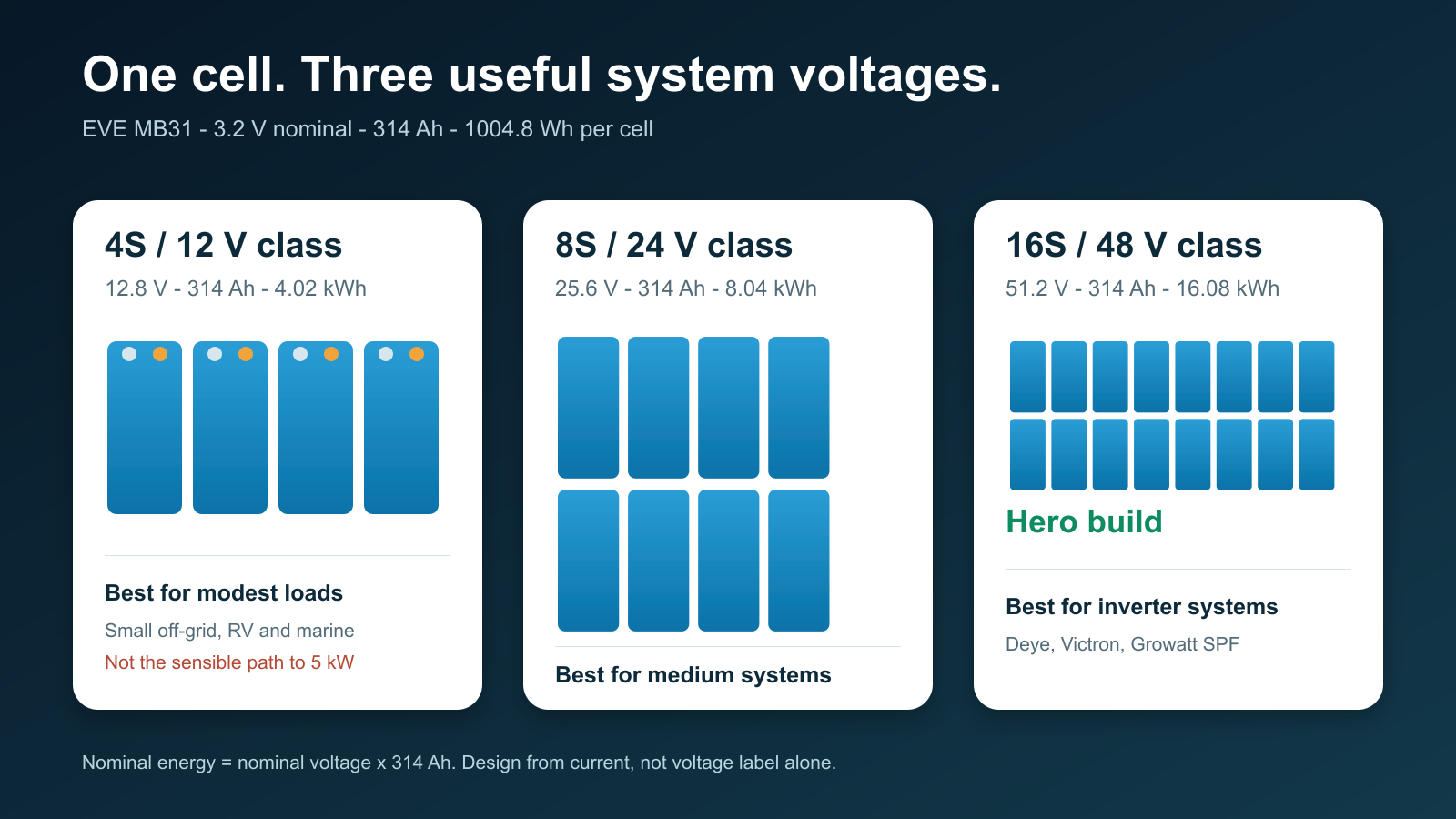
Sixteen EVE MB31 cells make a 51.2V, 314Ah battery storing just over 16kWh. Eight make an 8kWh 24V-class pack, while four make a 4kWh 12V-class pack. The cells are the same, but the current, BMS, copper, protection and sensible inverter size are very different.
Read this before touching a busbar
A large LiFePO4 pack can deliver destructive fault current even when its nominal voltage is below 60V. Cell terminals remain live. A BMS, open switch or removed fuse does not make the cell string electrically dead.
This article is educational and does not replace the EVE, JK, inverter, fuse, enclosure or installation instructions. In Queensland, the Electrical Safety Office says a licensed electrician should install a battery energy storage system, including a custom-made battery bank. Fixed wiring, inverter connection, grid connection, switchboard work and final BESS commissioning belong with appropriately licensed people. A DIY battery may also be unsuitable for a grid-connected installation, approved-product requirement, rebate, warranty or insurer.
The correct place to start is the largest continuous inverter load, expected surge, lowest normal battery voltage, inverter efficiency and allowable voltage drop. Do not start with “I have always used 12V.”
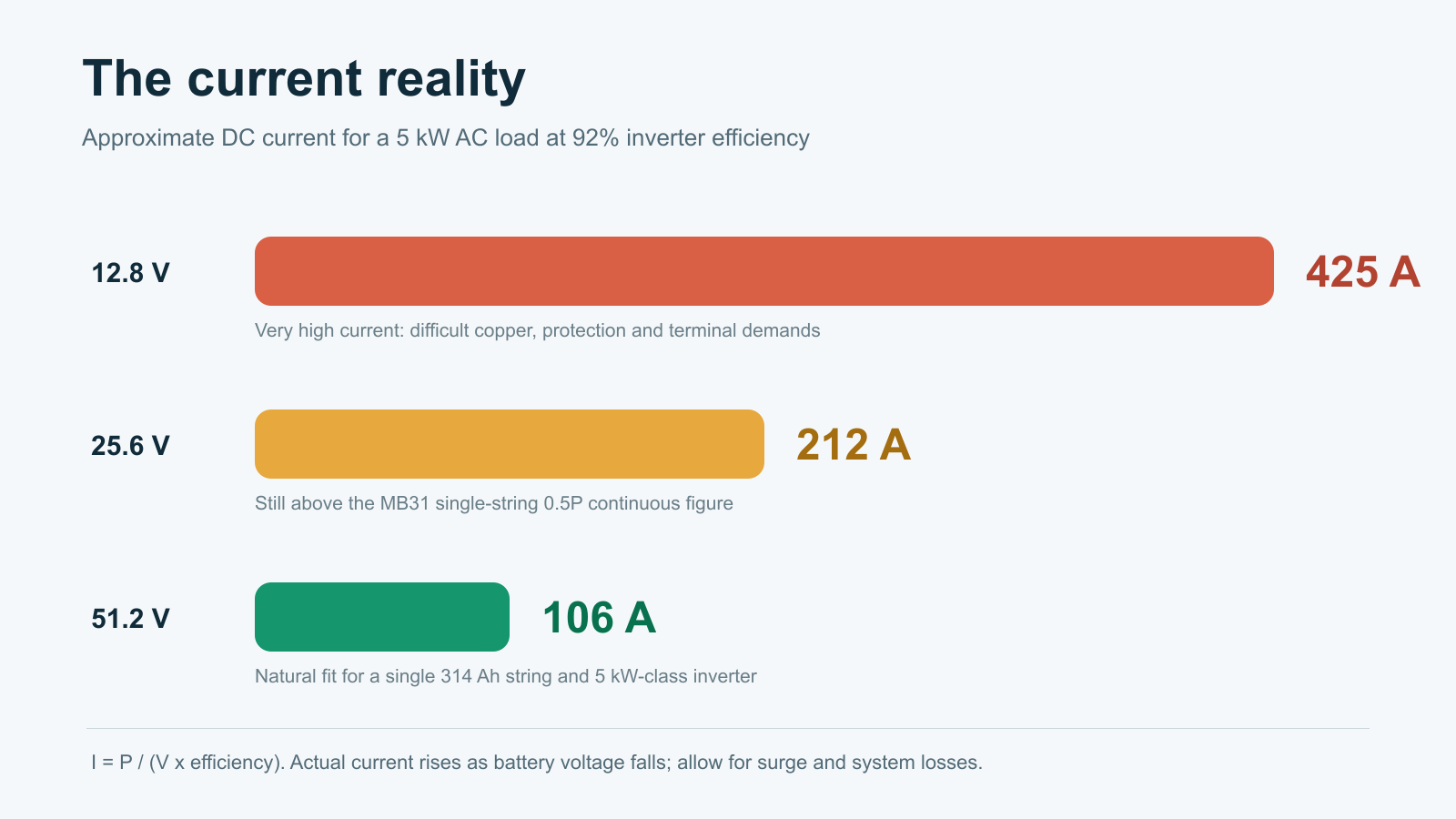
The approximate battery current is:
DC current = AC load watts / (battery voltage x inverter efficiency)
At 92% inverter efficiency, a 5kW load requires approximately 425A from a 12.8V pack, 212A from a 25.6V pack and 106A from a 51.2V pack. Actual current rises as battery voltage falls, and surge, inverter self-consumption and conductor losses add more.
The same inverter load becomes much easier to manage as system voltage rises.
4S
12.8V / 4.02kWh
Best for modest RV, marine and small off-grid loads. A single MB31 string is not a sensible route to a continuous 3-5kW inverter.
8S
25.6V / 8.04kWh
A practical middle ground for medium off-grid systems and roughly 2-3kW inverter loads when the complete current design supports it.
16S
51.2V / 16.08kWh
The hero build for home storage and modern inverter systems. It naturally suits a 5kW-class Deye, Victron or Growatt installation.
Nominal energy is nominal voltage multiplied by 314Ah. The enclosure, BMS, protection and copper add substantial weight.
Important cell limit: the reviewed MB31 specification lists 0.5P maximum continuous charge and discharge power at 25°C. For a 314Ah, 3.2V cell, this corresponds to about 157A and 502W per cell under those conditions. A 200A BMS does not upgrade the cell, cable, terminal, busbar or fuse.
2. Why the EVE MB31 314Ah?
The MB31 is a strong all-round energy-storage cell. EVE lists 314Ah nominal capacity, 3.2V nominal voltage, 1004.8Wh nominal energy, approximately 5.6kg weight and 0.5P/0.5P standard charge/discharge capability.
Its greatest DIY advantage is not only capacity. The 280-314Ah prismatic-cell format has a mature ecosystem of enclosures, busbars, insulation, restraint systems and BMS hardware. That makes a 16-cell, 16kWh pack easier to support than many newer oversized cell formats.
A correctly rated 8S JK, or a compatible PB model after firmware/protocol verification
The reviewed PB manual covers 7-16S electrically, but inverter communication at 24V still needs confirmation for the exact hardware.
16S / 51.2V
JK PB inverter BMS matched to the required current
Confirm hardware revision, firmware, CAN/RS485 protocol and pinout for the actual inverter.
Never choose a BMS only because its headline current rating matches the inverter. A 200A BMS can still be the wrong choice if the cell, terminal, conductor, busbar, enclosure or fuse cannot safely support the intended current.
4. Parts and tools
Cells, BMS and monitoring
4, 8 or 16 traceable EVE MB31 314Ah cells
JK BMS matched to the exact series count, current and communication requirement
All specified cell and BMS/MOS temperature sensors
Compatible JK display/interface board where required
Verified CAN or RS485 cable built from the exact two product pinouts
Mechanical assembly and insulation
Rigid enclosure with service access and protected conductor entries
Engineered restraint with flat end plates
Cell-to-cell insulation and a non-conductive base
Terminal and busbar covers
Strain relief, abrasion protection and secure BMS mounting
The reviewed EVE specification lists a recommended cell compression force of 3000-7000N and an instantaneous maximum of 10000N. This is force across the cell face, not threaded-rod torque. Do not invent a bolt torque without an engineered clamp geometry and measurement method.
Power path and tools
Busbars and terminal hardware suited to the actual cell variant
DC-rated fuse with suitable voltage rating, interrupt rating and time-current behaviour
Load-rated DC disconnect where required by the design
Conductors, lugs and supports sized for the installation method
Pre-charge resistor and switching method designed for the inverter input capacitance
CAT-rated multimeter, insulated probes and insulated tools
Calibrated torque wrench or screwdriver
Proper lug crimper and cable cutter
Thermal camera for staged-load commissioning
EVE specifies a maximum pole torque of 6N·m in the reviewed MB31 datasheet. Confirm that value against the actual terminal variant, adapters and fasteners supplied. Use a calibrated tool and record the final result.
5. Inspect the cells before assembly
Do not assemble first and discover a problem later. Record the supplier, batch/QR information, physical condition, resting voltage and consistently measured internal resistance for every cell. Capacity-test if that is part of the acceptance plan.
Quarantine any cell with a dent, swelling, leak, corroded or damaged terminal, abnormal voltage or unexplained measurement outlier. A severely over-discharged cell should not be “recovered” as part of a public tutorial.
6. Top balancing: choose a controlled method
Top balancing is a commissioning process, not a ritual that must be repeated routinely. Two defensible approaches are common:
Parallel top balance before assembly: bring the cells to the same upper state of charge with a current-limited bench supply, verified polarity, temperature monitoring and continuous supervision.
Assemble and commission slowly: construct the series pack, verify every sense connection, charge at low controlled current and allow the active balancer to correct the upper-curve spread.
Do not use a “set the supply and walk away” method. The process needs current limiting, supervision, a clear termination criterion and respect for EVE’s 3.65V absolute charge limit. For a dedicated walkthrough, see How to Top Balance LiFePO4.
7. Mechanical assembly
Prepare a clean, dry, non-conductive bench and remove jewellery.
Confirm cell orientation against a printed series map.
Install cell-to-cell insulation before fitting busbars.
Place cells into the restraint system without lifting from the terminals.
Apply controlled, even restraint within the manufacturer’s force limits.
Install one busbar at a time while neighbouring terminals stay covered.
Use only an approved method to prepare mating surfaces.
Tighten with the correct sequence and calibrated torque tool.
Apply a torque mark and replace the terminal cover immediately.
Compare measured total series voltage with the sum of the individual cells.
Never rest the BMS, tools, fasteners or loose busbars on exposed cells.
8. Verify every BMS sense lead before connection
A misplaced balance lead can damage the BMS or create a short through the harness. Wire colour alone is not proof.
Leave the BMS sense connector unplugged.
Attach the harness to the cell string in the exact order shown in the manual.
Measure each adjacent step at the unplugged connector: B0-B1, B1-B2 and onward should each show one cell voltage with correct polarity.
Measure cumulatively from B0 to every successive pin. Voltage should rise by one cell at each step.
Stop if any step is negative, zero or close to two cell voltages.
Verify B-, P-, display, communication and temperature connections.
Only insert the sense connector after an independent recheck.
9. The BMS is not the fuse
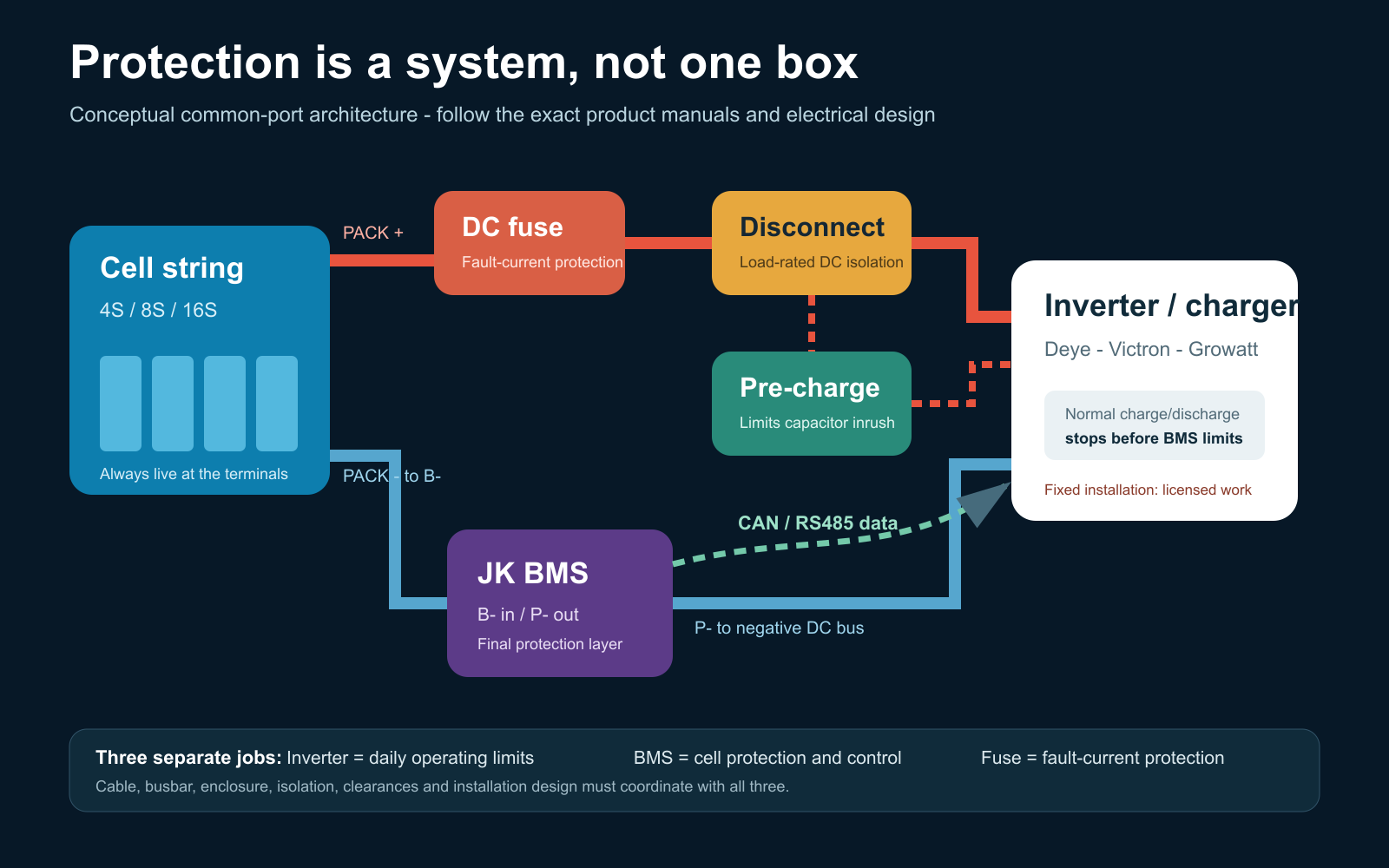
The inverter, BMS and fuse perform different jobs and must be coordinated with the rest of the design.
In a common-port MOSFET arrangement, cell-string negative connects to BMS B-, and BMS P- connects to the negative DC bus. Cell-string positive goes through the engineered positive protection and isolation path to the DC bus. Follow the exact JK manual for the hardware being used.
The fuse protects against fault current. It requires an adequate DC voltage rating, interrupt capacity and time-current relationship with the conductors and equipment. A pre-charge circuit limits inverter-capacitor inrush before the main path is closed. Read our discussion of 48V battery circuit breakers and Class T fuses.
An RJ45 connector does not guarantee an Ethernet pinout. Verify both ends of every JK-to-inverter communication cable and continuity-test it before connection.
10. Conservative JK settings for an MB31 pack
The best settings make the inverter stop normal operation first, keep the BMS as the last-resort guardrail and leave the fuse to clear serious fault current.
Function
Starting value
Purpose
Chemistry
LiFePO4
Select before entering other values.
Cell count
4, 8 or 16 as physically built
Verify from the harness and cumulative voltage.
Capacity
314Ah or measured usable capacity
Establishes the coulomb-counter baseline.
Balance start
About 3.40V/cell
Balances on the upper curve rather than chasing mid-curve load sag.
Balance delta
10-15mV
Avoids hunting over tiny dynamic differences.
Controlled charge ceiling
3.55V/cell
Leaves margin below EVE’s 3.65V maximum.
Cell OVP
About 3.60V
Last-resort high-cell protection.
OVP recovery
About 3.45V
Provides useful hysteresis.
SOC 100%
3.50V/cell
Synchronises the fuel gauge; it is not the charge cutoff.
Float / maintenance
3.40V/cell if required
Avoids holding the pack at its charge ceiling.
Cell UVP
2.80V/cell
Hard BMS cutoff. Do not design routine cycling to 2.5V.
UVP recovery
About 3.00-3.05V/cell
Coordinate with restart behaviour.
Charge low-temperature stop
0°C
Matches the lower end of EVE’s listed charge range.
Charge low-temperature recovery
3-5°C
Prevents cycling at freezing point.
Emergency mode
OFF
It overrides normal protections and is not an operating mode.
Pack-voltage equivalents
Pack
Charge at 3.55V/cell
100% sync at 3.50V/cell
Float at 3.40V/cell
BMS UVP at 2.80V/cell
4S
14.2V
14.0V
13.6V
11.2V
8S
28.4V
28.0V
27.2V
22.4V
16S
56.8V
56.0V
54.4V
44.8V
Normal low-voltage operation: set the inverter’s routine low-SOC or low-voltage stop above 2.80V/cell, allowing for voltage sag at the design load. The 2.80V JK value is a hard last-resort cutoff, not the normal end of every cycle.
Do not simply enter the BMS’s maximum current as the charge/discharge limit. The operational current must respect the MB31 continuous limit, conductor and busbar ampacity, terminal temperature, fuse coordination and inverter behaviour. Over-current delays, short-circuit delay and smart-sleep behaviour must be verified against the exact JK firmware.
LiFePO4 does not need lead-acid-style float charging. If an inverter requires a float field, 3.40V/cell is a conservative maintenance value for this project. See our separate LiFePO4 float-voltage guide.
11. Deye, Victron and Growatt SPF integration
Closed-loop CAN or RS485 communication can allow the BMS to report SOC, alarms, requested charge voltage, charge-current limit and discharge-current limit. It does not remove the need for safe fallback settings.
Deye / SunSynk
Record the full JK and Deye model, hardware revision and firmware.
Verify CAN versus RS485 and both connector pinouts.
Select the matching JK inverter protocol and lithium/BMS mode.
Confirm SOC, requested voltage, current limits and alarms on both devices.
Disconnect communication in a controlled test and prove the intended fallback/fault response.
Victron
A Victron system may use a GX device, DVCC and compatible CAN-bus integration, or it may run open-loop. Do not assume native support until the exact JK firmware/protocol and Victron architecture have been tested. Existing site references include connecting a JK inverter BMS to Victron and the Victron Multi RS 48/6000 JK CAN example.
Growatt SPF
Growatt SPF is a family, not one universal protocol. Confirm the full inverter model and firmware, CAN/RS485 requirement, battery protocol, pinout, lithium-menu selection and safe open-loop fallback values.
12. First power-up and commissioning
Before energising
Cell model, quantity and polarity match the drawing.
No damaged or quarantined cell is installed.
Restraint and insulation are complete.
Every busbar and terminal is torqued, marked and covered.
Every adjacent and cumulative sense voltage is correct.
B-/P-, fuse, disconnect, conductor and pre-charge designs have been checked.
Temperature probes are installed at representative locations.
The inverter is isolated from AC, grid and PV as required by its shutdown procedure.
Controlled commissioning sequence
Wake the BMS without the inverter load and compare every cell reading with the multimeter.
Check all temperature sensors and alarm states.
Verify charge/discharge switching and the configured limits.
Pre-charge the inverter using the designed method.
Close the main DC path only after the voltage difference has fallen to the design criterion.
Begin at low power and compare BMS, external meter and inverter readings.
Increase load in planned steps while recording cell delta, voltage drop and temperatures.
Thermally inspect terminals, busbars, BMS and conductors after a meaningful load soak.
Stop for a hot connection, rising cell temperature, swelling, abnormal smell or sound, unstable voltage, unexplained cell divergence or a mismatch between instruments. Do not deliberately short the pack or force cells beyond safe limits to “test” protections for a video.
13. Parallel packs need separate protection
Parallel packs are separate energy sources. Each pack needs a compatible BMS and normally its own branch fuse and isolation, connected to an engineered common bus.
Match chemistry, series count and operating voltage.
Bring pack voltages close before connection.
Use an engineered current-sharing/busbar arrangement.
Configure unique BMS addresses where required.
Confirm how total charge and discharge limits reach the inverter.
Prove that one isolated pack cannot overload the remaining pack.
Never connect packs at significantly different voltages and expect the BMS to control equalisation current.
14. A good battery finishes with documentation
A battery is not finished merely because it turns on. Keep a permanent pack record containing:
one-line diagram and cell-series map
cell and BMS datasheets
final settings and firmware versions
cell inspection, torque and thermal-test records
fuse, disconnect, conductor and pre-charge details
shutdown, restart and emergency procedures
SDS location, maintenance schedule and alarm meanings
Future checks should review enclosure condition, moisture or pests, event logs, cell-delta trends, terminal condition and temperature under a known load. Do not casually retorque live terminals.
The build philosophy in one minute
Choose voltage from current and inverter power.
Keep normal continuous current within the cell and complete-system limits.
Inspect and document every cell before assembly.
Restrain, insulate, torque and cover the pack correctly.
Verify every balance lead with a meter before connecting the BMS.
Make the inverter stop normal operation before the BMS guardrails.
Use 3.55V/cell charge, 3.50V/cell SOC sync, 3.40V/cell float if required and 2.80V/cell only as the hard low-voltage cutoff.
Commission in controlled stages and record the thermal result.
If the JK BMS is not turning on when first connected, follow these steps to troubleshoot and properly power it up.
1. Check the Wiring Connections
Ensure the balance leads are connected correctly
The B- lead should be connected to the main negative of the battery pack.
The balance wires must be connected in the correct sequence:
B0 (Black wire) → Main negative terminal of the first cell
B1 → Positive terminal of Cell 1
B2 → Positive terminal of Cell 2
B3 → Positive terminal of Cell 3
B4 → Main positive terminal of the battery pack
2. Verify Cell Voltages
Measure the voltage between each balance wire using a multimeter.
Ensure all cell voltages are within a reasonable range (typically 3.2V – 3.6V per cell).
If any cell voltage is missing or significantly different, the BMS may not power on.
3. Check the Main Power Connection
B- Wire (Main Negative): Ensure the thick B- wire is securely connected to the main negative of the battery pack.
P- Wire (Output Negative): This connects to the load/charger and should not be used for powering the BMS initially.
4. Manually Activate the BMS
Some JK BMS units require manual activation if they don’t turn on automatically.
Try plugging in a charger (even briefly) to the battery terminals to “wake up” the BMS.
Alternatively, hold down the power/reset button (if available) for 3-5 seconds.
If you dont have the power button, consider sourcing one
5. Check if the BMS is Drawing Current
Use a multimeter in DC current mode to check if any current is flowing through the BMS.
If the BMS is drawing zero current, it may indicate a wiring issue or a defective unit.
6. Test Communication with the App
Download the JK BMS App on a smartphone.
Turn on Bluetooth and try scanning for the device.
If the BMS does not appear, it is still off or not receiving power.
7. Inspect for Factory Sleep Mode
Some BMS units are shipped in a factory sleep mode, requiring a charger or an external power source to turn on.
8. Reset the BMS
If all else fails, disconnect all connections for 1-2 minutes, then reconnect everything carefully.
Final Check
Once the BMS powers on, verify that all cell voltages are detected correctly in the app.
If issues persist, check the BMS documentation or test with another BMS to rule out a faulty unit.
STILL NOT WORKING? Its probably in sleep mode
If the JK BMS is in sleep mode and does not have a power button, here are all possible ways to wake it up:
1. Connect a Charger to the Battery
Most common method: Connecting a charger to the battery terminals will usually wake up the BMS.
Plug a LiFePO4-compatible charger (or a power supply) into the battery’s main terminals (B+ and B-).
Even a brief connection (a few seconds) might be enough to turn the BMS on.
2. Connect a Charger to the Load Side (P+ and P-)
If charging via the battery terminals does not work, try connecting the charger to the load terminals (P+ and P-).
Some JK BMS models wake up when voltage is applied here.
3. Apply a Small Load Across P+ and P-
Some JK BMS units wake up when they detect a current draw.
Connect a small 12V load (e.g., a 12V light bulb or small resistor) across P+ and P- for a few seconds.
4. Jumpstart the BMS Using a Resistor or Wire
Take a resistor (~1kΩ – 10kΩ, 0.5W or higher) or a jumper wire and temporarily connect:
B+ (battery positive) to P+ (load positive)
B- (battery negative) to P- (load negative)
This creates a tiny voltage differential, which can wake the BMS up.
5. Disconnect and Reconnect the Balance Leads
Sometimes, disconnecting and then reconnecting the balance leads (B0-B4) in the correct order can trigger the BMS to power on.
Steps:
Disconnect the balance connector from the BMS.
Wait 1-2 minutes.
Reconnect it in the correct sequence (B0 → B1 → B2 → B3 → B4).
6. Use a Bench Power Supply to Apply Voltage to B+ and B-
If the BMS is completely unresponsive, try applying a small amount of voltage from a bench power supply.
Set the power supply to 12-14V, and briefly connect it to B+ and B-.
This simulates a charger and can often wake up the BMS.
7. Check for a Reset Pin on the BMS Board
Some JK BMS units have an internal reset pin or pads that, when shorted for a second, will wake the unit.
If comfortable opening the BMS case, check for labeled pads (like RST or SW) and try shorting them momentarily.
Final Step: Replace the BMS
If none of these methods work, the BMS might be defective or damaged. Testing with another BMS will confirm whether the issue is with the battery or the unit itself.